ChatGPT Token Counter, Claude Token Counter & Why AI Chats Forget Things Mid-Conversation
ChatGPT and Claude don't warn you before they start forgetting earlier parts of a long chat. Here's what a token counter actually tracks, why the forgetting happens silently, and how to see it coming.
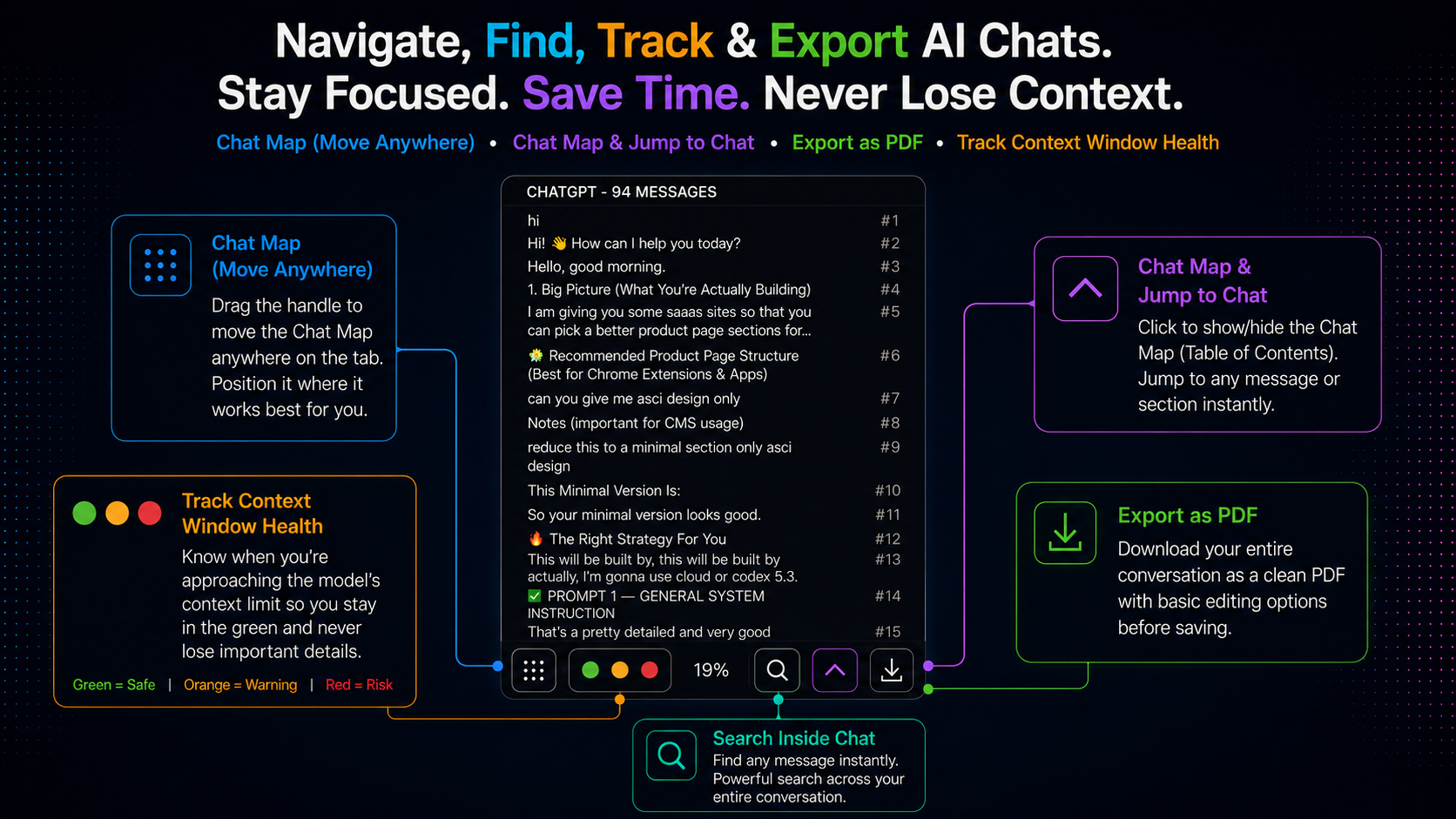
You’re forty messages into a long ChatGPT or Claude conversation. You gave it an instruction near the start — a tone, a constraint, a fact to remember — and somewhere along the way it stops following that instruction. Not because it disagreed. Because it can’t see that part of the conversation anymore. No error message, no warning. This post covers why that happens and the one practical fix: watching a token counter before you hit the limit, not after.
Why ChatGPT and Claude “Forget” Things
Every message you send to ChatGPT or Claude includes the entire conversation so far, not just your latest line — the model has no persistent memory between messages, so the whole transcript gets resent every time. The context window is the maximum amount of that transcript the model can process in one request, measured in tokens (roughly, chunks of text close to but not exactly a word). It isn’t a setting you configure — it’s a fixed property of the model, and it varies by which model and plan you’re using. The exact numbers change as providers ship new models, so the specific figure matters less than this: normal usage in a long technical conversation, a large pasted document, or an extended back-and-forth reaches it more easily than most people expect.
What Actually Happens When You Hit the Limit
Neither platform stops and tells you. There’s no “conversation too long” message, no popup. Instead, the oldest messages quietly drop out of what gets sent to the model, the most recent ones stay, and the model responds normally — with no visibility into the fact that a chunk of earlier context just disappeared. From the outside this looks like the model getting worse or more forgetful the longer you talk to it. Functionally, that’s exactly what’s happening — it isn’t “getting dumber,” it’s working from a transcript that no longer includes everything you told it.
Signs You’ve Already Lost Context
- It repeats a question you already answered, sometimes word-for-word.
- It contradicts a decision you both made earlier — reverting a naming convention, an approach, a constraint you settled on.
- It stops following an early instruction — a tone, a format, a rule — while still following more recent ones.
- It re-explains something you already covered, as though the conversation restarted mid-thread.
One of these could be an ordinary mistake. Several clustering together in a long conversation is usually context loss, not a reasoning failure.
ChatGPT Token Counter: What It Tracks and Why ChatGPT Doesn’t Show One
ChatGPT has no built-in way to see how close a conversation is to its context limit — there’s no counter, no meter, nothing in the interface. A ChatGPT token counter fills that gap: it’s a live tracker of how much of the current conversation’s context window is in use, so you know where you stand before the model starts dropping earlier messages instead of inferring it afterward from degraded answers.
Chaturai adds exactly this — a small pill that sits on the page and updates in real time as a ChatGPT conversation grows. It’s draggable to wherever’s convenient on screen, and it can be switched off entirely from the control center if you’d rather not see it.
Claude Token Counter
The same pill covers Claude, tracking context usage in real time exactly like it does on ChatGPT. This matters because Claude conversations — long-form writing, extended reasoning sessions, large pasted documents — tend to run long in exactly the ways that make context limits relevant, so having the counter visible there specifically is not an afterthought.
Why This Matters More for Some Work Than Others
Short, self-contained questions rarely run into this. It becomes a real problem in exactly the situations people lean on ChatGPT and Claude the hardest: a long debugging session where earlier decisions matter later, a research thread that builds on itself over dozens of exchanges, an extended writing project where tone and continuity need to hold across the whole document, or any conversation where a large document or codebase was pasted in early and you’re still relying on the model remembering its contents forty messages later.
How to Actually See It Coming
The fix is visibility — knowing where you stand before context starts dropping, not after. With a token counter visible, that changes what you actually do in a long conversation:
- Start a fresh conversation at a natural breakpoint, once the counter is climbing, rather than continuing until the model visibly starts forgetting things.
- Carry forward only what matters — paste a short summary of key decisions into the new conversation instead of hoping the old one still remembers them.
- Recognize degraded responses for what they are. If the model contradicts earlier decisions and the counter is high, that’s a context problem, not a reasoning problem — re-asking the same way won’t fix it, starting fresh will.
Setup is the same as the rest of Chaturai’s sidebar: add the extension to Chrome, open ChatGPT or Claude, and the counter appears automatically.
A Related, Separate Problem: Losing the Conversation Itself
A token counter explains why a model forgets things within one long chat. A different, equally common problem is losing track of a past conversation entirely — the good answer from three weeks ago buried under two hundred newer chats with no way to find it again. That’s an organization problem, not a model limitation, and folders, tags, and search are what solve it. The complete ChatGPT sidebar guide covers that in full, this FAQ answers specific setup questions for folders, search, and export, and Gemini and Grok users get the same token counter too.
Frequently Asked Questions
Why does ChatGPT forget things I told it earlier in a long conversation? Because the conversation has grown past what the model’s context window can hold, and the platform silently drops the oldest messages from what it sends to the model — no warning shown.
Is there a ChatGPT token counter? Not built into ChatGPT itself. Chaturai adds a live token counter pill that tracks context usage in real time for both ChatGPT and Claude.
Is there a Claude token counter too? Yes — the same pill covers Claude, tracking context usage the same way it does on ChatGPT.
How do I count tokens in a ChatGPT conversation? The token counter pill tracks this automatically and continuously — no manual counting needed.
Does starting a new chat fix the forgetting problem? Yes — a new conversation starts with a clean context window. It doesn’t automatically carry forward what mattered from the old one, so pasting in a short summary of key decisions first is worth doing.
Does this happen on Claude too, or only ChatGPT? Both, and every model with a context window — it’s a property of how the model processes a conversation, not a quirk of one platform.