Gemini Folders & Grok Folders: How to Organize Google Gemini and Grok Chats
Gemini and Grok don't have folders either. Here's how to add folders, tags, search, and a token counter to Google Gemini and Grok — the same organizer that already works on ChatGPT and Claude.
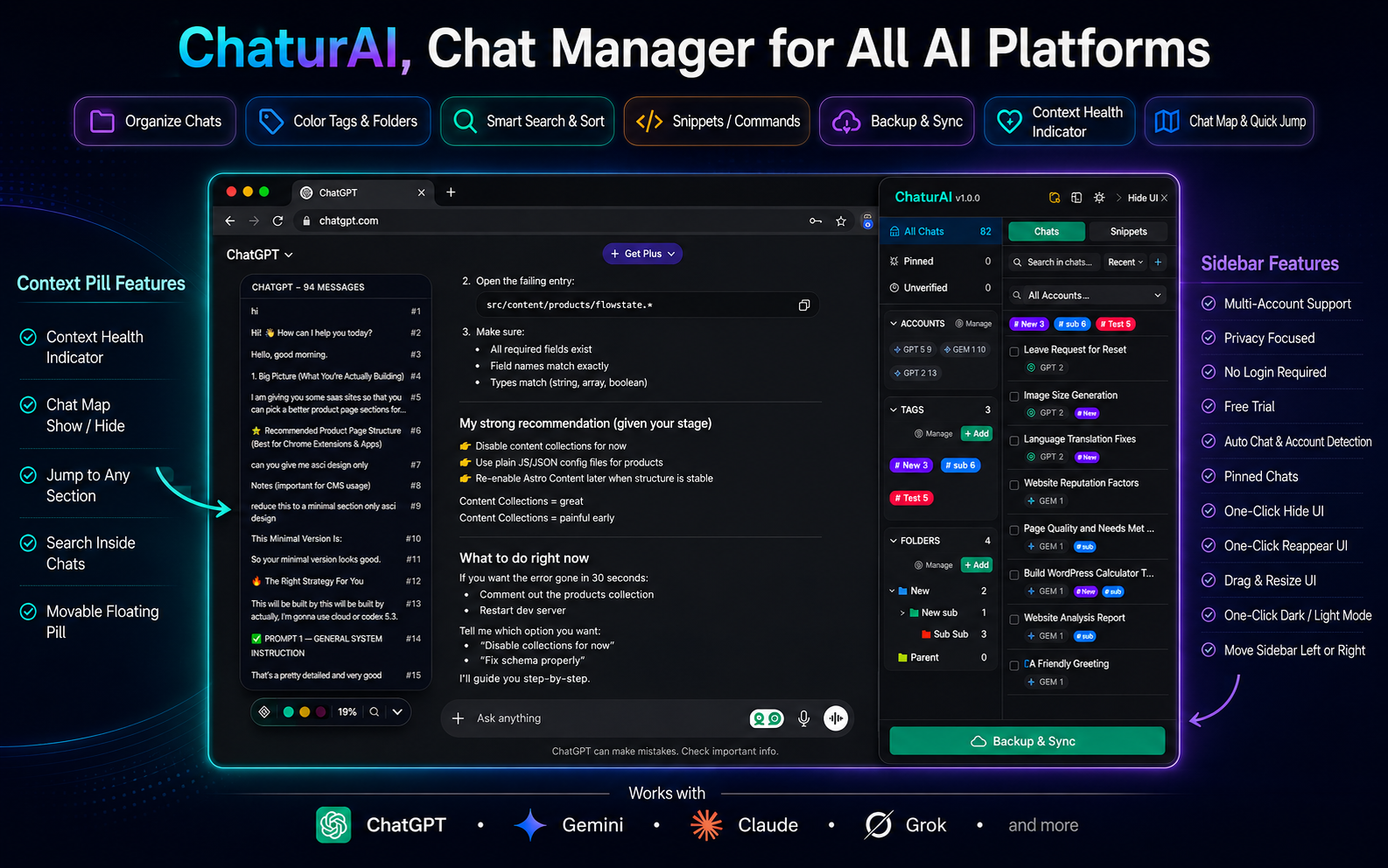
Most ChatGPT organizer extensions stop at ChatGPT. A smaller number also cover Claude. Almost none of them touch Gemini or Grok — which means if Gemini is where you do your Google Workspace-connected work, or Grok is where you go for real-time takes, you’re usually left with nothing but the native flat chat list and no way to change that. This post is specifically for Gemini and Grok users: how to get folders, tags, search, and a token counter on both, using the same free extension — Chaturai — that already covers ChatGPT and Claude.
Why Gemini and Grok Users Get Overlooked
Gemini’s chat history lives inside the Gemini app or gemini.google.com, and it has the same problem ChatGPT does — a flat, reverse-chronological list with no folders, no tags, and titles generated from your first message. It gets worse for anyone using Gemini across Google Workspace, since work and personal usage often blend into the same undifferentiated list. Grok’s history on x.com/grok has the identical structure: no organization layer, nothing beyond scroll-and-hope.
Because Gemini and Grok have smaller third-party extension ecosystems than ChatGPT, most of the “AI chat organizer” tools that do exist simply never built support for them — they’re ChatGPT-first or ChatGPT-only, with Gemini and Grok as an afterthought if they’re mentioned at all. Chaturai treats all four platforms as first-class from the start: the same sidebar, the same folders, the same tags, the same search, on ChatGPT, Claude, Gemini, and Grok alike.
Gemini Folders: How to Organize Google Gemini Chats
Install Chaturai, open gemini.google.com, and the sidebar appears next to your existing Gemini chat list automatically — no import step. Click the folder icon, name a folder, pick a color, and drag any Gemini conversation into it. Folders nest up to three levels deep, exactly as they do on ChatGPT and Claude. Free plan: 5 folders. Pro: unlimited.
Is There a Gemini Organizer or Gemini Chat Manager?
Yes — Chaturai works as a full Gemini organizer and Gemini chat manager: folders to group chats by project, tags to filter across projects, pin and archive for individual chats, and a fuzzy search bar that covers your Gemini history alongside ChatGPT and Claude. It’s the identical system across all three, not a separate Gemini-specific tool with different limitations.
Folders for Gemini Across Work and Personal Accounts
Because Gemini is often tied to a Google Workspace account, work and personal Gemini usage tends to blend into one list. Chaturai’s multi-account detection separates them automatically — a personal Gemini account and a work one each get tracked as their own space in the sidebar, so folders built for one don’t get cluttered with chats from the other.
Grok Folders: Organizing Your Grok Conversations
The same sidebar, the same folder system, the same drag-and-drop — just on grok.com or x.com/grok instead. Open Grok with Chaturai installed, click the folder icon, and organize exactly as you would on any other platform. Grok folders nest three levels deep and support the same tagging and pinning as ChatGPT, Claude, and Gemini.
Search and tags work on Grok too — a tag like “research” can sit on a Grok chat and a ChatGPT chat simultaneously, and clicking it surfaces both together regardless of platform.
Gemini Token Counter
The same live token counter pill that tracks context usage on ChatGPT and Claude also covers Gemini — a small draggable indicator showing how close a conversation is to its context limit before the model starts silently dropping earlier messages. For the full explanation of why that matters, see why ChatGPT and Claude forget things mid-conversation — the same mechanism applies to Gemini.
Can I Export a Gemini Chat to PDF?
Not yet — export currently covers ChatGPT and Claude, with Gemini export to PDF actively in development. Folders, tags, search, and the token counter already work on Gemini today; export is the one piece still being built out.
Can I Export a Grok Chat?
Same answer as Gemini: not yet. Grok export is in development alongside Gemini export. In the meantime, folders, tags, and search already organize your Grok history — export will follow the same one-click pattern already live for ChatGPT and Claude once it ships.
One Sidebar for ChatGPT, Claude, Gemini, and Grok
The point of covering Gemini and Grok isn’t to bolt on minimal support — it’s that a real AI chat organizer has to work everywhere you actually have conversations, or you’re back to maintaining separate systems per platform. If a research thread starts on Gemini and continues on Grok, both can sit in the same folder, wear the same tag, and turn up in the same search. That’s the full picture the complete ChatGPT sidebar guide covers in depth, this FAQ answers specific setup questions for the features that are further along on ChatGPT and Claude, and the same slash-command prompt snippets work on Gemini and Grok too. Add Chaturai to Chrome once, and it’s live on all four platforms immediately.
Frequently Asked Questions
Does Gemini have folders built in? No — Gemini’s native interface is a flat, reverse-chronological chat list with no folder system. Chaturai adds folders, tags, pin, archive, and search to Gemini the same way it does to ChatGPT and Claude.
Is there a Grok organizer? Yes — the same Chaturai sidebar works on Grok, with identical folders, tags, and search to ChatGPT, Claude, and Gemini.
Can I export a Gemini or Grok chat to PDF yet? Not yet — export currently supports ChatGPT and Claude. Gemini and Grok export are both in active development. Folders, tags, and search are already live on both.
Is there a Gemini token counter? Yes — the same live token counter pill available on ChatGPT and Claude also tracks context usage on Gemini.
Do I need a separate account or subscription for Gemini and Grok support? No — one Chaturai install covers ChatGPT, Claude, Gemini, and Grok under the same free or Pro plan. There’s no separate product or add-on for Gemini and Grok specifically.
Can I put a Gemini chat and a Grok chat in the same folder? Yes — folders and tags aren’t platform-specific. A single folder can hold a ChatGPT draft, a Claude research thread, a Gemini summary, and a Grok analysis all at once.