ChatGPT Folders, Chat Manager, Token Counter & Exporter: Every Question Answered
How do I add folders to ChatGPT? Where's the token counter? Can I export a ChatGPT chat to PDF? Direct answers to the exact questions people search, in one place.
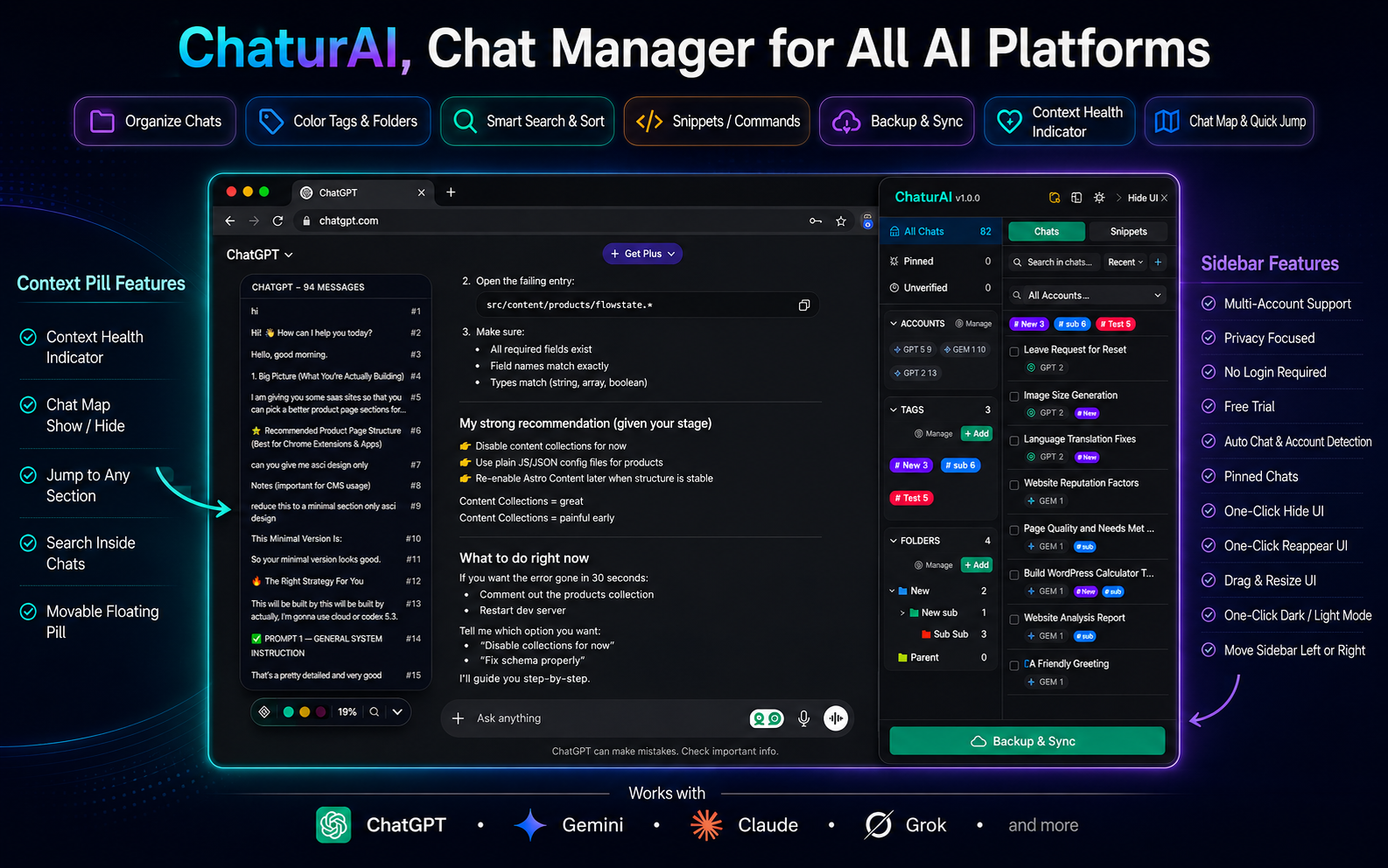
Straight answers, no filler. Every heading below is a question people actually type into Google. Chaturai is the free Chrome extension that answers “yes” to most of them — it adds folders, tags, a token counter, search, and export to ChatGPT and Claude. Want the full walkthrough first? Read the complete ChatGPT sidebar guide. Otherwise, find your question below.
Organizing: Folders, Tags, Pins & Managers
How do I add folders to ChatGPT?
Install Chaturai, open chatgpt.com, and a sidebar appears next to your existing chat list automatically — no import, no setup. Click the folder icon, name your folder, pick a color, and drag any ChatGPT conversation into it. Folders nest three levels deep. The free plan includes 5 folders; Pro is unlimited.
Does ChatGPT have folders built in?
Not for the flat conversation list most people use. ChatGPT’s native sidebar is reverse-chronological with auto-generated titles — no drag-and-drop folders, no color-coding, no nesting by project. Chaturai closes that gap without changing how you talk to ChatGPT — you’re still on the real ChatGPT interface, just with an organization layer on top.
Is there a ChatGPT organizer that also works on Claude?
Yes — Chaturai is a ChatGPT organizer and a Claude organizer at once. Folders, tags, and search work identically on both, so a project spanning a ChatGPT draft and a Claude research thread can live in the same folder and wear the same tag.
What’s the best ChatGPT chat manager or ChatGPT history manager?
A chat manager needs three things to actually help: folders to group chats, tags to filter across projects, and search that works when you don’t remember the exact title. Chaturai’s sidebar does all three for ChatGPT and Claude (folders/tags/search also cover Gemini and Grok), functioning as a single chat manager and history manager instead of separate tools per platform.
How do I add tags to ChatGPT conversations?
Open the sidebar’s tag manager, create a tag — “urgent,” “reference,” whatever fits — and apply it from any chat’s context menu. Tags cross platforms: the same tag can sit on a ChatGPT chat, a Claude chat, and a Gemini chat, and clicking it surfaces all of them together. Free plan: 5 tags. Pro: unlimited.
How do I pin a ChatGPT chat so it doesn’t get buried?
Pin it from the chat’s context menu and it stays at the top of the sidebar no matter how much new history piles up underneath. Pinning is for the handful of chats you reopen constantly; folders are for longer-term organization.
How do I archive ChatGPT chats without deleting them?
Same context menu, archive instead of pin. Archived chats leave the main list but stay fully intact — nothing is deleted, they’re just out of the way until you need them again.
How do I organize Claude chats into folders?
Exactly the same way as ChatGPT — open the Chaturai sidebar on claude.ai, click the folder icon, and drag any Claude conversation in. Same folders, same nesting, same tags, because it’s the same sidebar system across platforms.
Is there a Claude organizer or Claude chat manager?
Yes. Claude gets the same folders, tags, pin/archive, and search as ChatGPT — there’s no separate “Claude version” to learn, it’s the identical sidebar.
How do I switch between multiple ChatGPT accounts?
Chaturai detects and separates accounts automatically — no manual login/logout required. Sign into a personal and a work ChatGPT account (or two Gemini accounts, or free and paid Grok) and each is tracked as its own space in the sidebar. This is Chaturai’s account switcher: free plan supports 1 account per platform, Pro supports 2.
Search: Finding Old Chats
How do I search my ChatGPT history?
Use the search bar in the Chaturai sidebar. It’s a fuzzy match — type part of a remembered phrase, even slightly out of order, and it will usually still find the chat without needing the exact title.
Can I search Claude history the same way?
Yes — ChatGPT history search and Claude history search happen from the same search box, which matters when you’re not sure which platform a conversation happened on in the first place.
Is there a table of contents for long ChatGPT chats?
Yes — it’s called chat map. Long conversations (a 200-message debugging session, a multi-hour research thread) are hard to navigate on any platform’s native UI because there’s no way to see the shape of the conversation at a glance. Chat map builds a live, clickable table of contents so you can jump straight to the message you need instead of scrolling past everything in between.
Token Counters: ChatGPT, Claude & Counting Tokens
Where is the ChatGPT token counter?
ChatGPT doesn’t show one natively. Chaturai adds a small draggable pill on the page that tracks context usage in real time. It updates as the conversation grows, so you see the limit approaching before the model starts silently forgetting earlier parts of the chat.
Is there a Claude token counter?
Yes — the same pill covers Claude too, tracking context window usage in real time exactly like it does on ChatGPT.
How do I count tokens in a ChatGPT conversation?
You don’t need to count manually — the token counter pill does it live as you type and as responses come in, showing roughly how much of the context window is used at any point in the conversation.
Why does the token counter matter?
Because ChatGPT and Claude don’t warn you before dropping earlier context from a long conversation — there’s no error message, the model just starts responding as if earlier messages never happened. Seeing the number climb lets you start a fresh chat before that happens instead of after. Full explanation: why ChatGPT and Claude forget things mid-conversation.
Exporting: PDF, Markdown & JSON
Can I export a ChatGPT chat to PDF?
Yes. Open any ChatGPT or Claude conversation in the Chaturai sidebar, click export, choose PDF. Free plan: 10 PDF exports a month across ChatGPT and Claude combined. Pro: unlimited, watermark-free.
Is there a ChatGPT exporter that isn’t copy-paste?
Yes — that’s exactly what Chaturai’s export button is. One click turns the conversation into a real file instead of a wall of pasted text you have to reformat by hand.
How do I download a ChatGPT conversation?
Same export button — click it on any open chat and choose your format. It downloads directly; no copy-pasting into a document first.
Can I export ChatGPT to Markdown?
Yes, on Pro. The export button offers PDF, Markdown, and JSON — Markdown is the format for pasting into notes or documentation. The free plan’s export allowance covers PDF only.
Can I export a Claude chat to PDF?
Yes — export works identically on Claude as on ChatGPT: PDF, Markdown, or JSON, one click.
Can I export a Grok chat?
Not yet — Grok export is actively in development. Folders, tags, and search already work on Grok today; export is coming.
Prompts: Saving, Managing & Reusing Them
How do I save ChatGPT prompts so I can reuse them?
Save the prompt once as a snippet in the Chaturai sidebar, give it a slash command like /summarize, and it inserts the full prompt anywhere you type that command — on ChatGPT, Claude, Gemini, or Grok.
Is there a ChatGPT prompt manager or prompt saver?
Yes — snippets are Chaturai’s prompt manager. Free plan: 5 snippets. Pro: unlimited. Full guide to building one that’s actually worth maintaining: ChatGPT prompt library with slash commands.
Is there a Claude prompt manager too?
Yes — the same snippet system and the same slash commands work identically on Claude, so you’re not maintaining separate prompt libraries per platform.
Do slash commands work in ChatGPT?
Yes. Type the slash command you assigned a snippet (/review, /brief, whatever you chose) into the ChatGPT chat box and it inserts the full saved prompt instantly.
The Basics
Does this work with Claude, Gemini, and Grok, or just ChatGPT?
All four. Folders, tags, and search work identically across ChatGPT, Claude, Gemini, and Grok. The token counter currently covers ChatGPT and Claude. Export currently covers ChatGPT and Claude, with Gemini and Grok in development. If Gemini or Grok is your main platform, see the dedicated Gemini folders and Grok folders guide for setup specifics.
Is Chaturai actually free, or is this a trial?
The free plan is permanently free — 1 account per platform, 5 folders, 5 tags, 5 snippets, local-only storage, a 10-message chat map preview, 10 PDF exports a month. Pro (monthly or yearly) removes those limits. Full details: Chaturai pricing.
Does Chaturai read or store my conversations?
No. It only works with the chat titles and timestamps already visible in each platform’s own sidebar — it doesn’t read prompts or responses. Folders, tags, and snippets stay local unless you turn on Cloud Backup, and even then only organizational data is backed up, never conversation content.
Do I need an account to start organizing my chats?
No. Folders, tags, snippets, search, and export all work immediately after installing — no sign-up. An account only matters for Pro or Cloud Backup.
Question this didn’t cover? The complete ChatGPT sidebar guide goes deeper on every feature, or add Chaturai to Chrome and find out firsthand.